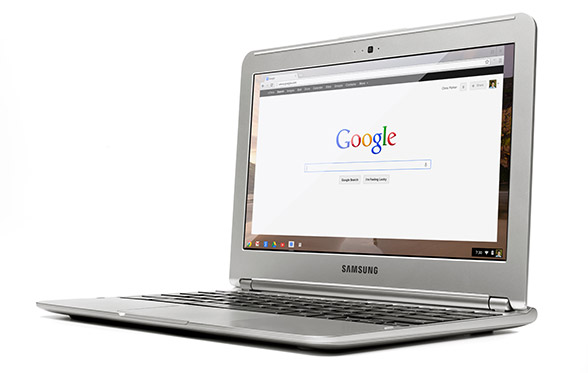
£229. Includes 100GB of space on Google Drive. 11.6" screen. Nice keyboard.
This little notebook, netbook, laptop, call it what you like, is something I omitted from my First Thoughts article. It changes everything and has really got me thinking - second thoughts, of a sort.
It's actually the
Samsung Chromebook and is a delightful device in many respects. First, the price. That's less than half of what you'd expect to pay for a decent laptop and a good £100 less than what I would say was it's closest competitor, a Lenovo Ideapad S206. Even that's a clunky looking device.
Second, it will be ready to use out of the box, well, 10 seconds later. That's the start-up time which no Windows or Apple machine can even begin to match. This puts it firmly in Android or iPad tablet territory in that respect. One of the most frustrating things about using any computer has been the wait while things whirr away and decide whether or not to display a screen from which you can actually get on with whatever it was you wanted to do.
Third, it doesn't need updating or maintenance. As soon as you get a Windows machine, in particular but it can apply to Macs too, you'll probably find that the operating system has a pile of updates and patches that need to be installed. Remember 'Do not turn off or unplug your computer... 5 of 67 updates installed...'? Well, no more of that. Everything associated with the operating system will be updated over the internet automatically. Google are constantly checking and improving their Chrome OS and, just like their Chrome browser, you won't notice anything other than things improving. You don't need to worry about anti-virus or malware or nasty things generally. There's nowhere for them to go on these devices. And the updates are free. No worrying about whether you need to fork out for Windows 7, 8 or whatever or whether your computer is able to run it.
Fourth, it's completely quiet and cool. It doesn't need a fan. There's no hard disk spinning either and all this contributes to an expected 6½ hours before recharging.
So what's the down side then?
The operating system is, for all practical purposes, the Chrome browser and everything you do is based on on-line apps. That sounds really restrictive when you first read it but it may not be. I opened up Programs on my desktop and the screen filled with the list of software that is available to me - software that I might have to give up using on a Chromebook. How can I survive without all these? I wondered. Straightaway I realised that there was a huge number that I had either never used or just installed to experiement with. So I'll ignore those and look at what's left, which is still quite a few. (Now mine will be different to yours but there'll be some common types, I'm sure, so bear with me.)
Personal entertainment
Total Sound Recorder
Video editing
VLC and other DVD Players
Music Players
Amazon MP3 Downloader
BBC iPlayer
Vuze file sharing and bit torrent tools
Office and work software
Calculator
Notepad
Libre / Open Office
Microsoft Office
7Zip
Skype
Prey Security
Cisco VPN
Sony PC Companion
Design software
Coffee Cup mp3 and video web players
Irfanview
Picasa
Serif Web Plus, Draw Plus and Photo Plus
JAlbum
Dreamweaver
The items in bold are those that I use frequently - if not every day then several times a week for things I really need or want to do. The others I can live without on a regular device - as long as they are still available on something I can start up as and when necessary.
So could I run my day with a Chromebook? The question is really: Are there ways to do the same jobs using Chrome Apps or web tools? (Suddenly I appreciate just how important my web tools site is going to be - and how much I am going to have to update it now!)
Personal entertainment
Yes - I use Amazon's Cloud on my mobile and that works a treat so I am sure I'll be able to cope with that or one of many others that are listed on Google Play. What I won't be able to do is play tracks that I only have stored locally and currently use Media Player or Winamp for. So I'll need to have a larger selection on-line or put them on a CD and plug in an external drive. (I am assuming that will work fine but not sure how though.)
TV programmes I can watch without having to download a player nowadays and so the only tools I'll not have access to would seem to be sound and video recording or editing. I seldom need these, though, and don't mind firing up a PC to do this as and when required.
As you'll see later, I will retain a desktop of some sort with a large screen anyway to view TV and video so that can continue to meet fixed kit in the room needs and will have decent speakers too which no laptop will have.
Office work
There are apps that'll calculate and take quick notes. (I only used Notepad because it loaded instantly anyway.)
There's Microsoft 365 which is all on-line if I still need the familiar Microsoft environment for Word, Excel and PowerPoint. I can get by quite happily without other members of the Office family. More importantly, though, Google Documents will be sufficient for nearly all of my day-to-day requirements and there is an off-line capability now in this application which means I don't have to be connected to work with documents. A synchronisation process will cut in whenever internet access is available to ensure everything is updated accordingly.
This will also be available for GMail. I use no other mail service and have never been bothered about having an off-line access to mail since abandoning Outlook a long, long time ago. However, I am aware that there are many people who will take a while to get out of the 'downloading' mail way of working but I am sure that, if using GMail as it stands doesn't persuade them to stop worrying, the off-line facility will.
There will be some more complex Excel files or lengthy Word documents, though, that I would prefer to work on or with in the Microsoft environment. I am a huge fan of Google Documents but still struggle to make everything look as good or work as well as I can achieve with Old Blue. So I will be keeping an old version of Microsoft Office on that occasional use PC too.
I can happily abandon Libre Office or Open Office now and will not miss either.
I believe that Skype will be available as an app soon rather than something that will need to be downloaded. As Microsoft now own Skype there is, I suppose, the query as to how simply it will integrate with Chrome but for the occasions when I do want to use video call or conference facilities there are other more than adequate apps like the excellent meetings.io.
I'll still need an unzipping utility and I'm not aware yet of an app for that. This may be something else I need the old PC for but, again, it's not a frequently used tool. (I am assuming that it will be possible to save attachments onto a USB drive. Need to check that.)
That leaves three important but little used bits of software. Prey is my mobile device security manager. I use CISCO VPN to access files on a University intranet. It's an ancient and clunky affair that, along with Prey and my mobile PC Companion, I guess will remain on the old PC for the very occasional times I need them.
Design software
These are probably more important to me than they will be to most because I do a lot of original artwork and web design. I would, in any event, prefer to use a traditional PC with a large screen, mouse and tablet for this work and to do so at a desk. Even if none of the above had done, this justifies the retention of a traditional desktop. I should remember too that I would still also keep the big screen anyway to watch TV or movies on - and the decent speakers.
So I can keep all the items listed there. What I may well want on a portable device will be some photo access and management tools. Picasa is already on-line and well integrated - I shall just have to save more on-line. At present it's just the best stuff but having back-up of photos on-line is something I really should have been doing a lot more than I ahve to daye anyway.
I am slowly moving from Dreamweaver to Serif Web Plus for new sites but that work remains desktop and Windows-bound. I wonder whether Serif, or someone, will make a move to put web design on-line? I am also increasingly attracted to the likes of Wix, Weebly and Yola too which can produce excellent results wholly on-line for fairly simple requirements. Google Sites has been around for ages too but never been terribly popular. I do hope that there are some developments soon as this is an area that I would like to be able to work in on the move.
JAlbum already has a good on-line system. Irfanview I will miss. The ease of managing things like screen prints or very quickly adjusting an image on the go, rather than waiting for heavier programmes to rev up and get going, I have written admiringly about for years. Perhaps it might run from a USB drive somehow? Something else to investigate. There are, however, lots of new image editing apps now on the scene so I guess it might not be a problem at all. Indeed I may find something new and even better, speed never being a problem with a Chromebook.
In conclusion, therefore, there will be a clear separation of activities and getting a Chromebook would force a change of work methods that perhaps I will ultimately find quite beneficial. I will have a modest desktop unit from which I can strip a lot of stuff and retain just for fixed things: an entertainment centre and design workhorse, plus one or two occasional maintenance or administrative matters. These are all things where start up speed is not vitally important, nor is a change of operating system. My present PC will last for a while. When it gets tired then I'll get a Shuttle but no rush.
The Chromebook will be the default device I start up each morning to check mail, write articles with, social network on, buy things on and organise my life and communication generally with. Depending on the answers to a few of the questions I've raised, it may even take care of quite a bit of basic photo editing and management too.
I can't see any advantage now of getting a Windows laptop. The reasons I stopped using my last one were:
- the time it took to get started,
- erratic behaviour
- it was noisy and very hot
- even the 15.6" model was a bit big and inconvenient
- 1½ to 2 hours battery life meant I nearly always was working with restricting leads
A Chromebook will remove every single one of those points.
Is a tablet an option? It could be but it would need a keyboard for the amount of writing work I do. The Microsoft Surface tablet running RT simply will not give me access to enough additional software and apps seem few and far between yet. It is also damn expensive at £479 including the cover and I'd really want the even more costly better keyboard option too.
The ASUS TFT300T with its detachable keyboard is something I have liked for a while. It's £380, though. That's £150 more. The Android system will be fast and familiar but I can't see it being any better than a Google embedded system. Updates will depend too on the hardware, just as some phones don't seem to qualify automatically for the latest edition, so I'm not sure how far down the Android A-Z dessert road it will get. Not a major issue, though, but with a smaller screen, does the £150 justify the smart tablet + keyboard combination?
I'll need a fair bit of on-line storage with either Android or Chrome OS. Google Drive currently charge $4.99 a month for 100GB. You get 2 years' worth FREE with the Chromebook (and 5 550 model). That's nearly $120 worth. At US prices the Chromebook would cost me a net $150. That's a no-brainer for anyone in the States. Here in the UK it cuts the cost to about £150. Still seems like one hell of a bargain to me.
So decision made. Whatever Microsoft or Apple announce this week! Now, back to my son's desktop PC...