Showing posts with label Google Photos. Show all posts

31 July 2015

Windows 10 (and The Return of the Back-up)


I thought I'd give Windows 10 a try. All I had to do was hit the little icon that had appeared a while ago as it seems the bulk of the download had already arrived.I started a few minutes before 7pm.


At about 7:30pm it was more or less complete.


7:35pm Windows 'welcomes me back'! Not that I had gone anywhere' I'd 'sat back and relaxed' as the previous screens instructed!


A couple of minutes later the attractive new screen appears briefly. Note that the time was an hour and ten minutes out! That was a bit strange.


The pretty screen goes quickly though and a minute later I am reassured that whatever's happening won't take long.


It didn't. After 'taking care of things' at 7:39pm I was able to use the new system, basically carrying off where I'd left off with a few tasks, at 7:40pm. Say, at the outside, 45 minutes from start to finish. I was impressed and the appearance is attractive. You will want to adjust the colours of the small tiles that appear in the Start menu, probably getting rid of quite a few!

So far all my old programmes work fine, including Office 97!! Dreamweaver MX had a spot of bother closing but had worked fine and Task Manager soon shut it down for me.

Just one problem but I am not at all sure it was a Windows 10 thing. I rely on the Auto Back-up feature that used to be a Picasa thing and is now a Google Photos affair. I am pretty sure it stopped the day before in 8.1 as there were no back-ups of new photos transferred from my camera on 29th July morning. Strangely, some items I had used to illustrate a blog and some photos I'd put on Facebook were backed up! Very odd.

Being quite concerned I put a plea for help in various places but got no response. Eventually I spotted this evening a comment from someone on the Picasa users forum that Google Photos backup hadn't been working in Windows 10 so the guy had uninstalled them both and reinstalled them. It worked for him and it worked for me too. I had tried downloading the gphotosback-up_setup file with Picasa in place but that wouldn't even open and was declared 'incompatible' by Windows. Clearly the uninstall / reinstall is the key if you happen to get stuck too.

So all is well, so far. To be honest, I don't see much difference but I guess some improvements will emerge in due course. I haven't used Edge yet but am told that is quite a major improvement on the browser front. Cortana will speak to you if you have a microphone or just give you ideas for various queries. She does insist on Bing, though. I guess that's understandable.

If you're happy with 8.1 then stay with that for a while as there are bound to be several tweaks and updates during the first few months. It is a free upgrade for most Windows 7 or 8 users which I think is great but you have ages to take advantage of that. No hurry but also no major issues that I can see if you decide to go for it now.


02 May 2015

Please Google. It's time to update Picasa / Photos to make what should be simple tasks less awkward.

After all this time Google Photos and Picasa are still not working terribly well together. For many tasks, I adore Picasa and find it suits so many of my day-to-day storage, editing and publishing needs.

I would like to see some updating of the slideshow feature which is very old-fashioned now and doesn't display on some mobile or tablet browsers but there are simpler things which just annoy me and could be changed quite easily if someone could get their act together in San Francisco or wherever the teams are based.

Actually some bright sparks could probably recode it from a beach anywhere if they felt that way inclined. Here's an example that might encourage them to get the laptops, sorry, Chromebooks, out.

I maintain a site that catalogues and describes Corgi Toys from the 1950s to 1970s. On each model page I include photographs of items I have or have had in stock. These are Picasa web albums. I tried putting images on the pages but that made the whole site amazingly heavy and was also  pain to update. The album, whilst not displaying everywhere as I'd like, is, at least, a nice simple solution and it doesn't look too bad. If I get different models, I just take fresh pictures and tweak the album set and the changes are automatically shown on the page.


For various reasons, including finding the pictures to upload somewhere like Ebay for example, I need the filename of a photo displayed. Here's the rpocess we have to follow... first, click on the web album...


That takes you to a Picasa Web Album page for that photo. Great, you think, just note the file name. It must be there somewhere. Er, no. It's not. You need the Photo Details page.... click on the link...


Now we're in Google Photos. Same photo, slightly different surroundings. But still no filename!! Heavens, this getting crazy. There's a link on the right to Photo Details. Let's click that...


Hurray!!! Let's jump up and down with delight! It has only taken three or four clicks and several periods of waiting for pages to appear to get here. I am absolutely sure that it ought to be feasible for the filename to be stored within the slide show or, at the very least, be easily accessible at the first web album page that appears when you click the image.

This would save me so much time. Of course, Ebay could help matters no end by permitting us to add images via urls instead of having to upload up to twelve big files every time. But that's another story.

For now, please Google Photo folk, or Picasa folk, make this a bit simpler. And while you're at it, can we please, please have some simple editing tools and better size control for images imported to Blogger? It's not much to ask nowadays. It almost seems like the Blogger, Picasa and Photos teams have been on holiday or maybe they were staffed totally by interns who are now elsewhere.


13 June 2014

Photos, photos everywhere but none to drop just here


I have just posted about this on Google+ but something else occurs to me and so I thought I'd write here too - sort of a frequently asked question that I can't answer!

I have a Google+ My Business Page about Corgi Toys and would like too add pictures to the Photos section. Even though it has the text 'Photos of you' which I think is a hangover from the normal user-type page it is clearly a sensible idea to show people who drop in on a business page something relevant to your business.

Now, you can upload photos from your computer in the usual way. That's OK but nowadays photos are massive - 4000 by 3000 pixels is a pretty common camera size as standard and I've seen plenty bigger too. Even though people have larger resolution displays than the old 640 days I am quite content with images around the 1600 x 1200 size which are still going to fill best part of a great many monitors and these will show plenty of detail too.

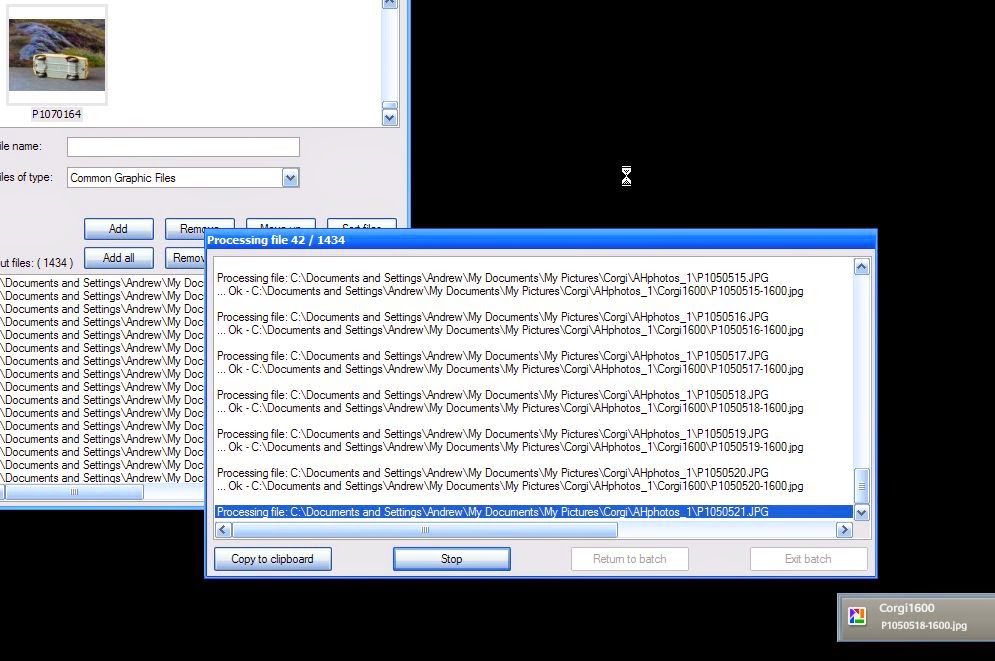
So the process would involve first resizing the original, renaming it and saving it somewhere, then uploading to the Google+ page. That's OK for a few images but I have nearly 2000. That's not all - why should I spend what could be many hours uploading them all when copies are already uploaded! Google Photos Auto Backup service has one or two things that annoy me but they're fairly trivial and the important thing that it does really well is upload everything almost as soon as it finds it. Indeed, as the more observant may spot, the screenprint below shows Picasa adding the 1600 versions of 1434 photos that Irfanview is batch editing from 4000x 3000 originals in one hit. Just out of shot is Google Photo's Auto Backup busily uploading the new 1600 size files.

Now, if the new 1600 size files were being uploaded to a place I could get at them from my Corgi Toys Business Page that would be brilliant but they're not. I can get at them as me but not as the me editing my Business Page.


Just to make this all even crazier - and you may have already appreciated this and smiled ruefully - Google Photos Auto Backup has already backed up the originals (well a slightly reduced size version which makes a zero impact on my file storage space but more than enough for web use). So there are now two perfectly usable image files up there and neither can be simply transferred to my Business Page. It's not as if I am asking for something impossible here; Google's Blogger makes this simple - using an image from a Picasa Web Album.


I suppose someone may write to me and say that I am missing something really obvious but I suspect that there are actually many others out there who have several Pages on Google+ and would like to be able to share images more sensibly.

I first wrote about this in connection with articles bout American Idol and X Factor where I had albums of contestant photos on my hard drive but had to upload to each place separately. That was bearable as there were usually just 20 or so at the most. With 2000 and counting Corgi Toy images this is a serious business!

I am presently using Irfanview to change the dimensions and save new files and will then upload a few at a time and see how that goes. It is such a drag but, until someone comes to my assistance, that's how it has to be. Or, I suppose, I could just not bother and just have a blog post about each model and the post and one photo will get automatically added by Blogger to the Corgi Toy page. That works well ad I am at a loss to know why it cannot work within Google+.

Oh well.