Showing posts with label laptop. Show all posts

26 October 2012

Lenovo IdeaPad Yoga. Very cool but you just know it'll be expensive!


Lenovo's promo video for their great-looking IdeaPad Yoga range coming our way 'soon'. The 13" screen Yoga 13 will be the one to go for unless you're willing to take a chance on whether your favourite applications will run on Windows 8RT with the Yoga 11. The Lynx K3011 has the most boring name but seems to be the only model that splits so that it can be just a tablet, rather than folding or twisting to achieve the same thing. Battery life looks very impressive at >11 hours too, with a 11.6" screen, possibly second choice and all look very good ways to resolve the laptop-or-tablet debate.

The blurb specifies Windows 8 Pro for the 13, Windows 8RT for the 11 and Windows 8 for the Lynx. I just have this feeling that they're not going to be at all cheap. There's that video to pay for too. That girl looks so much like someone I used to know, not that that's got anything to do with the product, although it will make me want to find out more. 

23 October 2012

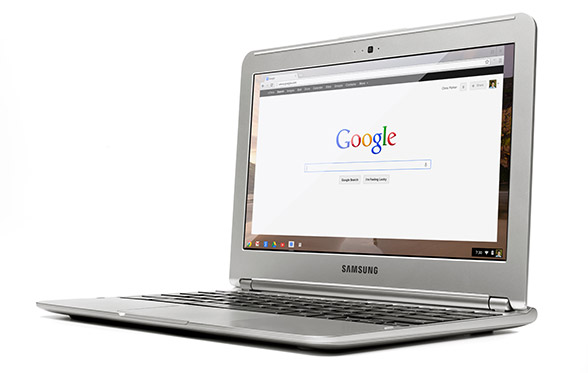
The Chromebook. 100GB Free Storage. One Decision Made Easy.


£229. Includes 100GB of space on Google Drive. 11.6" screen. Nice keyboard.

This little notebook, netbook, laptop, call it what you like, is something I omitted from my First Thoughts article. It changes everything and has really got me thinking - second thoughts, of a sort. 

It's actually the Samsung Chromebook and is a delightful device in many respects. First, the price. That's less than half of what you'd expect to pay for a decent laptop and a good £100 less than what I would say was it's closest competitor, a Lenovo Ideapad S206. Even that's a clunky looking device.

Second, it will be ready to use out of the box, well, 10 seconds later. That's the start-up time which no Windows or Apple machine can even begin to match. This puts it firmly in Android or iPad tablet territory in that respect. One of the most frustrating things about using any computer has been the wait while things whirr away and decide whether or not to display a screen from which you can actually get on with whatever it was you wanted to do.

Third, it doesn't need updating or maintenance. As soon as you get a Windows machine, in particular but it can apply to Macs too, you'll probably find that the operating system has a pile of updates and patches that need to be installed. Remember 'Do not turn off or unplug your computer... 5 of 67 updates installed...'? Well, no more of that. Everything associated with the operating system will be updated over the internet automatically. Google are constantly checking and improving their Chrome OS and, just like their Chrome browser, you won't notice anything other than things improving. You don't need to worry about anti-virus or malware or nasty things generally. There's nowhere for them to go on these devices. And the updates are free. No worrying about whether you need to fork out for Windows 7, 8 or whatever or whether your computer is able to run it.

Fourth, it's completely quiet and cool. It doesn't need a fan. There's no hard disk spinning either and all this contributes to an expected 6½ hours before recharging.

So what's the down side then?

The operating system is, for all practical purposes, the Chrome browser and everything you do is based on on-line apps. That sounds really restrictive when you first read it but it may not be. I opened up Programs on my desktop and the screen filled with the list of software that is available to me - software that I might have to give up using on a Chromebook. How can I survive without all these? I wondered. Straightaway I realised that there was a huge number that I had either never used or just installed to experiement with. So I'll ignore those and look at what's left, which is still quite a few. (Now mine will be different to yours but there'll be some common types, I'm sure, so bear with me.)

Personal entertainment 

Total Sound Recorder
Video editing
VLC and other DVD Players
Music Players
Amazon MP3 Downloader
BBC iPlayer
Vuze file sharing and bit torrent tools

Office and work software

Calculator
Notepad
Libre / Open Office
Microsoft Office
7Zip
Skype
Prey Security
Cisco VPN
Sony PC Companion

Design software

Coffee Cup mp3 and video web players
Irfanview
Picasa
Serif Web Plus, Draw Plus and Photo Plus
JAlbum
Dreamweaver

The items in bold are those that I use frequently - if not every day then several times a week for things I really need or want to do. The others I can live without on a regular device - as long as they are still available on something I can start up as and when necessary.

So could I run my day with a Chromebook? The question is really: Are there ways to do the same jobs using Chrome Apps or web tools? (Suddenly I appreciate just how important my web tools site is going to be - and how much I am going to have to update it now!)

Personal entertainment

Yes - I use Amazon's Cloud on my mobile and that works a treat so I am sure I'll be able to cope with that or one of many others that are listed on Google Play. What I won't be able to do is play tracks that I only have stored locally and currently use Media Player or Winamp for. So I'll need to have a larger selection on-line or put them on a CD and plug in an external drive. (I am assuming that will work fine but not sure how though.)

TV programmes I can watch without having to download a player nowadays and so the only tools I'll not have access to would seem to be sound and video recording or editing. I seldom need these, though, and don't mind firing up a PC to do this as and when required.

As you'll see later, I will retain a desktop of some sort with a large screen anyway to view TV and video so that can continue to meet fixed kit in the room needs and will have decent speakers too which no laptop will have.

Office work

There are apps that'll calculate and take quick notes. (I only used Notepad because it loaded instantly anyway.)

There's Microsoft 365 which is all on-line if I still need the familiar Microsoft environment for Word, Excel and PowerPoint. I can get by quite happily without other members of the Office family. More importantly, though, Google Documents will be sufficient for nearly all of my day-to-day requirements and there is an off-line capability now in this application which means I don't have to be connected to work with documents. A synchronisation process will cut in whenever internet access is available to ensure everything is updated accordingly.

This will also be available for GMail. I use no other mail service and have never been bothered about having an off-line access to mail since abandoning Outlook a long, long time ago. However, I am aware that there are many people who will take a while to get out of the 'downloading' mail way of working but I am sure that, if using GMail as it stands doesn't persuade them to stop worrying, the off-line facility will.
There will be some more complex Excel files or lengthy Word documents, though, that I would prefer to work on or with in the Microsoft environment. I am a huge fan of Google Documents but still struggle to make everything look as good or work as well as I can achieve with Old Blue. So I will be keeping an old version of Microsoft Office on that occasional use PC too.

I can happily abandon Libre Office or Open Office now and will not miss either.

I believe that Skype will be available as an app soon rather than something that will need to be downloaded. As Microsoft now own Skype there is, I suppose, the query as to how simply it will integrate with Chrome but for the occasions when I do want to use video call or conference facilities there are other more than adequate apps like the excellent meetings.io.

I'll still need an unzipping utility and I'm not aware yet of an app for that. This may be something else I need the old PC for but, again, it's not a frequently used tool. (I am assuming that it will be possible to save attachments onto a USB drive. Need to check that.)

That leaves three important but little used bits of software. Prey is my mobile device security manager. I use CISCO VPN to access files on a University intranet. It's an ancient and clunky affair that, along with Prey and my mobile PC Companion, I guess will remain on the old PC for the very occasional times I need them.

Design software

These are probably more important to me than they will be to most because I do a lot of original artwork and web design. I would, in any event, prefer to use a traditional PC with a large screen, mouse and tablet for this work and to do so at a desk. Even if none of the above had done, this justifies the retention of a traditional desktop. I should remember too that I would still also keep the big screen anyway to watch TV or movies on - and the decent speakers.

So I can keep all the items listed there. What I may well want on a portable device will be some photo access and management tools. Picasa is already on-line and well integrated - I shall just have to save more on-line. At present it's just the best stuff but having back-up of photos on-line is something I really should have been doing a lot more than I ahve to daye anyway.

I am slowly moving from Dreamweaver to Serif Web Plus for new sites but that work remains desktop and Windows-bound. I wonder whether Serif, or someone, will make a move to put web design on-line? I am also increasingly attracted to the likes of Wix, Weebly and Yola too which can produce excellent results wholly on-line for fairly simple requirements. Google Sites has been around for ages too but never been terribly popular. I do hope that there are some developments soon as this is an area that I would like to be able to work in on the move.

JAlbum already has a good on-line system. Irfanview I will miss. The ease of managing things like screen prints or very quickly adjusting an image on the go, rather than waiting for heavier programmes to rev up and get going, I have written admiringly about for years. Perhaps it might run from a USB drive somehow? Something else to investigate. There are, however, lots of new image editing apps now on the scene so I guess it might not be a problem at all. Indeed I may find something new and even better, speed never being a problem with a Chromebook.


In conclusion, therefore, there will be a clear separation of activities and getting a Chromebook would force a change of work methods that perhaps I will ultimately find quite beneficial. I will have a modest desktop unit from which I can strip a lot of stuff and retain just for fixed things: an entertainment centre and design workhorse, plus one or two occasional maintenance or administrative matters. These are all things where start up speed is not vitally important, nor is a change of operating system. My present PC will last for a while. When it gets tired then I'll get a Shuttle but no rush.

The Chromebook will be the default device I start up each morning to check mail, write articles with, social network on, buy things on and organise my life and communication generally with. Depending on the answers to a few of the questions I've raised, it may even take care of quite a bit of basic photo editing and management too.

I can't see any advantage now of getting a Windows laptop. The reasons I stopped using my last one were:
  • the time it took to get started, 
  • erratic behaviour 
  • it was noisy and very hot
  • even the 15.6" model was a bit big and inconvenient
  • 1½ to 2 hours battery life meant I nearly always was working with restricting leads


A Chromebook will remove every single one of those points.

Is a tablet an option? It could be but it would need a keyboard for the amount of writing work I do. The Microsoft Surface tablet running RT simply will not give me access to enough additional software and apps seem few and far between yet. It is also damn expensive at £479 including the cover and I'd really want the even more costly better keyboard option too.

The ASUS TFT300T with its detachable keyboard is something I have liked for a while. It's £380, though. That's £150 more. The Android system will be fast and familiar but I can't see it being any better than a Google embedded system. Updates will depend too on the hardware, just as some phones don't seem to qualify automatically for the latest edition, so I'm not sure how far down the Android A-Z dessert road it will get. Not a major issue, though, but with a smaller screen, does the £150 justify the smart tablet + keyboard combination?

I'll need a fair bit of on-line storage with either Android or Chrome OS. Google Drive currently charge $4.99 a month for 100GB. You get 2 years' worth FREE with the Chromebook (and 5 550 model). That's nearly $120 worth. At US prices the Chromebook would cost me a net $150. That's a no-brainer for anyone in the States. Here in the UK it cuts the cost to about £150. Still seems like one hell of a bargain to me.

So decision made. Whatever Microsoft or Apple announce this week! Now, back to my son's desktop PC...


17 October 2012

Time For A New Desktop, Laptop Or Tablet? First thoughts.

Once upon a time if you wanted a computer you really had just two choices: something big with lots of parts and cables or something portable. A desktop or a laptop. That made decisions fairly easy. Now, life is much more confusing.

There are still desktops and laptops but we now have notebooks, netbooks, ultrabooks and tablets or pads.

As if that wasn't enough, most of us would have only to choose between a Windows or Mac operating system and that was pretty easy - you tended to be a big fan of one of the other or there was a clear case of which best suited what you wanted to do with it and price was quite a significant factor too.

Now we have Windows and Apple's IOS but Google have now properly entered the game with Android.

Some mobile phones, or smartphones as they're better termed now, are almost big enough to be considered as a computing device option for some too but that could really get complicated with Blackberry and others in the mix.

So, with a desktop that is beginning to look and feel a bit slow and a laptop that is noisy, gets hot enough to heat the room and is unbearable on a lap for long and with little more than an hour's unplugged use, it's time to get some new kit. But what? This is a simple run through of what I've found so far. The gamers and those to whom money's no object out there will not approve of my choices, I know, but this may be helpful to those who may have been getting as confused as I have by terminology and the huge range of prices.

A desktop still has many attractions. I tend to switch one on in the morning and it runs all day, being the main workhorse that runs all the programmes I need and where all my files, especially photos and documents are stored. I am increasingly storing documents on-line with Google Drive and working copies of photos on Picasa albums on-line but it will be a long time, if ever, before everything is stored there and, even if it's just for back-up, I can see I'll need a huge local hard drive of some sort that, for a while yet, a desktop provides.


There are nice quiet systems available now which are almost unnoticeable, not that my 4 year old one is at all noisy. My son's, which had a graphics card and power supply upgrade is a lot noisier though so he'd appreciate a newer, quieter box of some sort or size.

Windows 8 would still be the only choice for me as I tend to experiment with software and the things I use regularly, like web design software, design and photo editing software and even Office-type software, albeit to a lesser extent, need Windows and I would have to replace everything if I were to switch to a Mac. With a desktop I can hang on to the decent 19" screen and other ancillaries for a while which all work fine. I would really miss the lit keyboard keys at night so definitely want to avoid losing that. To get the most out of Windows 8 reports say that a touch screen is needed so, in due course, I may have to change the screen but initial prices are likely to be high and, actually at the moment, I can't imagine myself stretching out across the desk to wipe across the screen anyway. I like the screen at quite a distance away and I'll be quite happy to stick with the keyboard and mouse for some time yet which I am sure will be more efficient for much of my more detailed work. The swipe and drag screens are brilliant on phones and clearly suit tablets but I just don't see it being much use with a desktop and I'm sure new types of mouse movements and even good old keyboard commands will do for a while yet.

Something else a desktop will do well is act as an entertainment centre. I already have a decent set of speakers so it would also function well as my CD/DVD/mp3 player and even a radio, TV and video player quite adequately.

The key requirements are a fast processor - at least Intel i5 or AMD equivalent, a graphics card that can cope with most normal requirements (I'm not too worried about the really intense games, just as long as videos and the occasional game my son will play are reasonable), at least 4GB of RAM and a simple DVD player / burner would be useful.

A decent unit from Mesh would cost under £500 for that sort of spec so that's looking good.

Just as I was writing this I discovered while looking for something else an article on PC Advisor's Stateside site where they manage to do all this for under $500 but, of course, they can build it themselves which I can't!

For those that can, though, here's the actual components that PC Advisor (in the US) used to make their own:
Processor: AMD A8-3870K 3.0GHz Quad-Core Desktop APU - $108.99
Graphics: XFX Radeon HD 6570 1GB Graphics Card - $44.99 (after a $15.99 mail-in rebate) Motherboard: ASRock A75M-ITX Socket FM1 Mini ITX Motherboard - $89.00
Memory: Corsair Vengeance 8GB (2 x 4GB) DDR3-1866 Memory - $46.99
Storage: Seagate Momentus XT 500GB 7200 RPM Solid State Hybrid Drive - $79.99
Case: BitFenix Prodigy Mini-Tower - $79.00
Power Supply: Corsair Builder Series CX430 430W Power Supply - $24.99 (after a $20 mail-in rebate) Optical Drive: Lite-On iHAS124-04 DVD Burner - $16.99

[ Here's a link to the PC Advisor article ]
I like the sound, or lack of sound, of the new solid state drives and the idea of liquid cooling but these features are still quite expensive additions. The only thing I would like to change is the size of the flaming units. I had a lovely Shuttle about 8 years ago and iCubes offer some interesting devices which look neat and small. You can configure your own and I managed to get something with an i5 processor, a decent graphics card and 4G RAM in a new Shuttle or iCube box for about the same price as the Mesh desktop that met my requirements. That included a 64GB SSD drive which ought to help speed things along and keep the noise down too. That's not a lot of space but maybe I can figure out a way to utilise my old hard drives or spend a bit more if I can't so that's not a big problem for the benefit of the better appearance and space saving.

So for the main unit that's on all day and would do the most work, this Shuttle might have the edge.

Now, for something portable. I have been quite envious of colleagues whipping out their tablets (usually iPads) at meetings so I wondered whether there'd be anything in that line that would do what I needed.

If you need something to carry around, and to work with rather than just use on-line applications, then it will, again, need to be a Windows 8 piece of equipment. An iPad or Android tablet simply won't run any software I want to use so, attractive though devices are, they would seem to be luxury extras rather than essential tools at the moment. I need also to beware Windows 8 RT which I understand to be rather different to Windows 8 so the new Windows Surface devices don't look to be contenders either.


Something that does look attractive is the new Lenovo Yoga which looks like a laptop but the screen can slide to make it a still very thin tablet. But it looks expensive. Similarly the ASUS Transformer which has just come out, is beautifully made, with a screen that actually detaches as a 'real' tablet or locks in to work like a laptop. That's expensive too and is an Android machine so rules itself out on both counts if needed to run local programmes.

Looks like I'll have to give up on the tablet front then.


So, for the portable option, it's either a laptop, notebook, netbook or ultrabook. It may be a good idea sort these out once and for all. As far as I can gather, laptop = notebook so let's stick with laptop for now. A netbook would appear to be a small laptop, screens of up to 10" or maybe 11". They seem to be almost all Windows - one or two 7 inch running Andoid from makers I've never heard of - with a fair bit of choice but not as much as for ultrabooks. Now, ultrabook is a marketing term for a laptop that has been built to a specification set by Intel, in order to ensure a high-quality user experience. The requirements change as new chips are released and, for Ivy Bridge systems, currently include fast startup, a maximum thickness that varies according the screen size, and a battery life of at least 5 hours. So they're laptops without DVD drives made really thin and, ostensibly, with higher end processors, presumably Intel.
[ Read more ]

Netbooks are lovely little things and could cope with day-to-day software. You'd need to use a portable DVD drive to install stuff. Most come with Intel Atom or AMD's equivalent lower end processors and integrated graphics which are OK these days but not exactly brilliant, although they'll do for most purposes. They are so small, though, that they're far more likely to be used just for checking things on the net for which an Android machine or tablet will be just as good and, with all the free apps available, offers more flexibility in terms of what you can make it do for you on-line.

I'm not too bothered about how thick or thin the device is so it looks like a fairly boring sounding, standard-size, laptop will be the answer at the end of the day, despite all the wonderful new gadgets that are coming along. One with normal Windows 8 should be fine for a few more years. 


There are ASUS laptops with i5 processors, 6GB of RAM and all the features you'd need for about £400, including better cooling and sensitivity control that prevents the trackpad working when you accidentally brush it with a palm. Something like that would seem to make sense, provided you weren't using it all day long.

This is still a bit disappointing, though. I had hoped I might find something that didn't need to be clumsily opened up and which took a while to get going while my colleagues were busy slipping out their tablets and showing each other this or that before I'd even found the start button which, of course, doesn't exist any more. In fact, I am wondering whether I can get away with hanging on to my lap burning device for some time until someone does produce a tablet at a price I can manage that does let me work on some local design software like Serif or play music without an internet connection.

That seems to mean no laptop after all. Wait and see what happens with tablets.

It does seem that most of the tablets are very much 'luxury items' by which I mean they're not exactly needed for anything. That doesn't mean I don't want one - just that I don't really need one. My Xperia phone provides a fast and smart-looking browsing experience and will play movies and whatever else I might need it to do while lying around on the sofa, in bed or in the car. So, if I do persuade myself that I ought to have one I would be inclined to ignore most of the reviews that compare them to laptops in some shape, form or another and instead just get something that has a nice display that works. Android would, I think, be essential at least until Windows populate their apps store and possibly afterwards too, with the attraction of ever-improving free operating system upgrades.

I am very tempted by a Nexus 7, though. Just £190. Even though I don't need it. I would be able to join the 'have a look at this' club.

And put some of the £300 saved towards making a really good Shuttle or iCube perhaps. 


26 December 2011

Yes! ASUS Laptop Resolution Fixed [by me]

You may recall the last post about ASUS support saying that my laptop didn't support Windows 7 and there was no help available for changing the resolution or recognising the ATI card instead of some default PnP monitor...

... a colleague said 'just get the driver from ATI (now AMD). Tried that but still couldn't get Windows to recognise it and spent a while going round in circles. Then I had a look at an identical laptop that had been running Windows 7 fine for ages and I did know what graphics card it had and what to do with it. Diving into Display properties you can eventually find Driver details which lists all the files apparently required. I copied those from one machine to the other. The next time I hit Update Driver, instead of being told that I already had the most up-to-date driver for a PnP monitor, Windows proceeded to get what it reckoned I needed and a few moments later I see this screen.


So I'm afraid that ASUS support haven't exactly excelled themselves on this query and, presumably, have left a whole pile of customers languishing in XP or Vista land or with ovals where there should be circles.

I'm not quite sure whether my efforts actually helped or whether Windows just took its time realising the ATI card was there. Either way, job was done in time to give the youngest son his brother's previously ailing but now looking and working great laptop on Christmas morning. As few people will have more than one of these laptops, if you have a similar problem and need the driver file list just drop me an e-mail.


06 September 2009

My son's < fell off

It will happen from time to time. A key snaps off the laptop keyboard. It just happened to one of my son's, probably as a result of an argument with his big sister but that's not relevant here. What is relevant is how pleased I was to be able to put it back on again.

The keys have three components: the flattish bit with the letter, number or symbol on, a retainer device (usually plastic) and a metal clip which is unlikely to come away, being well fixed to the base around a squishy bit that handles the pressing of the key to make it work.

If you're lucky, just the flat bit with the symbol has come off. You can take these off with your fingers relatively easily, in fact, and they will snap back into position with a satisfying click.

If you're not so lucky, the retainer clip will have come off too. It may not be very obvious but a bit of careful poking around with a small screwdriver should separate the top of the key from the clip. You may find you can fit this back into position but if you're not sure which way up or where it locates itself, take another key top off and that'll give you an idea. Mine took a bit of fiddling and experimentation but it did eventually stay put.

Then you should be able to snap the key top back on.

If something has actually broken then spare parts are available and inexpensive - unless someone's damaged the base itself, I suppose.

All this I discovered by visting the excellent site called Laptop Repair Help which has nice photos and links for spares. Brilliant. Another reminder of just how the world has changed. One Google search and up comes the answer. I can't think of how many trips to shops, calls and messages that would have taken by any other method, let alone cost!

05 October 2008

FAQs they can answer

The CNET Community is one of those nice sites where you can get answers to problems and, in particular, read other people's questions and see what sort of replies they got. Yes, there are a few very geeky ones and a few more that even my daughter (she's the non-techy one) can answer but you can ignore all those if you like.

Here's the link. That'll take you to the Archives.

29 March 2008

XP one more time

I said I'd publish the replacement kit when I'd found something. Well, these were so well-priced at about £400 each I've ordered two of each! Mesh have served me well for many years and supply them with the following spec which ought to do me until operating systems settle down and do a bit more than look pretty. And who knows? Maybe Linux or even another will have broken through into the mainstream and we'll all be able to turn on and tune in without waiting for ages.

ASUS F5V-Pro Laptop


Windows® XP Professional Edition.
Intel® Core™ Duo T2250 Dual Core Processor (1.73GHz, 2MB L2 Cache, 533MHz FSB)
15.4" WXGA TFT with Active Colour (1280x800)
512MB (128 Dedicated) ATI Mobile Radeon X2300 Graphics
1GB DDR2 677MHz Memory (1 x 1GB)
120GB Serial ATA Hard Drive (NB)
DVD Super Format Dual Layer DVD Writer +R/-R/RW/RAM
Wireless LAN - 802.11b /g (with Built in antenna)
Built in Webcam (1.3M)
3-D Stereo Sound + Internal Dual Stereo Speakers
Gigabit LAN Ethernet (on-board)
56k v90/92 Fax Modem
3 x USB2, Line-in, Mic, Headphone, VGA, Gigabit LAN (X50, F5V)
Windows 88 keyboard with "Fn" key for extended function,
USB Mouse
ASUS carrying case with shoulder strap and pouch for accessories
367mm(W) X262mm(D) X35mm(H), Weight: 2.6 Kg - Inc Battery (F5V)
2 Years Worldwide Warranty Parts & Labour

Mesh Matrix xxx+ PC

AMD Phenom 8400 Triple Core AM2+ ( 2.1GHz, 2MB Level 3 Cache)
Windows® XP Media Center Edition 2005
New MESH Mini-Tower Micro ATX Case +300W PSU
AMD PCI Express Mainboard AM2+ Phenom MATX
4GB DDR2 667MHz Memory -( 2x 2GB )
500GB Serial ATA Hard Drive with 16MB Buffer
LightScribe Super Format 20x Dual Layer DVD Writer +R/-R/RW/RAM
256MB Integrated On-board Graphics (SMA)
19" Widescreen LCD TFT Display with internal speakers
5.1 High Definition onboard sound card - 6 Channel Cinema sound
Logitech Cordless Keyboard & Cordless Optical Mouse
Free Microsoft® Works® 8.5 + 60 Days Microsoft Office Trial
Free Cyberlink Video Editing Suite - 7 titles (oem)
4x USB 2.0 Ports (onboard)
Network Ready integrated 10/100 Ethernet
Multi-format Memory Card Reader (matx)
1 Year Hardware Warranty - Back to Base (UK Mainland only)